Cricfy TV

Cricfy TV is a third-party Android app for watching live sports and television over the internet. Cricket sits at the center of the app, while football and other sports add more event choices.
What Is Cricfy TV?
Cricfy TV is a third-party Android app for watching live sports and television over the internet. Cricket sits at the center of the app, while football and other sports add more event choices. The channel area also covers news and entertainment. You select an event or channel, then open its stream in the player. A live feed follows its program schedule. The app uses an APK file that you install on Android outside the Google Play Store.
It needs a working internet connection whenever you watch live video. Channel names, match links, and picture quality can change with the event and the feed. You can browse what is active when you open the app rather than rely on an old list. The app also offers scores and match details alongside some sports content. Its main purpose is to let viewers find sports and TV in one place, whether they have a short break or time to watch a full game.
How Cricfy App Works?
- The app connects viewers to online video feeds for sports and television. Open Cricfy TV, choose a content group, and select an event or channel. A player then opens the stream that is available for that listing.
- A match link can appear close to the start of a game, and it can change when the event ends. The picture depends on both the feed and your internet speed. A slower connection can lead to pauses or a lower video setting.
- The app also needs a feed, so a channel tile may no longer play. Some programs depend on the viewer’s location. You can return to the event list to see what is active at that moment. Live video is delivered over the internet.
- Saving the APK installs the app, but it does not save live matches on your device for offline viewing. This flow helps viewers move from a schedule to a stream without searching for a separate video file.
Key Features of Cricfy Live TV
Live Sports Streaming
Cricfy TV lets viewers open an active match from a sports listing. A live feed lets fans join a game already under way. The sports area brings different events into one place on Android. Pick a listing, open its stream, and return to the list when the game ends. What you can watch depends on the live feeds at that time. Check the event name and start time before watching. A clear match title helps you choose the right game first.
Live Television Access
The app includes television viewing beyond live matches. Sports channels sit alongside news and other TV content in the channel area. A viewer can move between groups and choose a feed that fits their interest. A channel plays its scheduled programs, which can change during the day. The channel list shows what can be opened. This brings general television to the Android device. The channel name helps you know which feed you are opening. You can return to the group list when a program ends.
Video Quality Options
Picture settings help viewers match a stream to their connection. A lower quality choice can use less data and make video easier to watch on a slower network. A higher choice needs more bandwidth and can use more mobile data. The result also depends on the picture supplied by the feed. Cricfy TV offers quality controls for a range of viewing conditions, but a setting cannot improve a poor source video. Start at a level that plays well, then change it when needed.
Live Scores and Match Information
Scores help fans follow a game when watching every minute is not possible. The app brings match status and result information close to its sports content. A listing can show the teams and the stage of a game before you open a video. Some event details also help you tell an upcoming match from one already in play. Live match scores can be useful during a short break, while the full stream is there when you have time.
Highlights and Replays
Short clips help viewers catch a moment they missed during a match. Highlights can focus on a goal, wicket, or other part of play. A replay gives more time with an event when one is available. Open the content list to see which videos are offered for the sport you follow. Cricfy TV brings these catch-up choices near its live sports area. The clip selection can vary from one match to the next, so look at the event page after the action ends.
Match Alerts
An alert helps a fan remember a game that starts later. Match notices can point to upcoming events and changes during play. You can review the settings and keep the alerts that suit the sports you watch. Your phone must allow the app to send notifications. Too many notices can become distracting, so choose the ones that are useful. Cricfy TV keeps match times close at hand through these updates, even when the app is not open on the screen.
Multiple Language Support
Viewers may prefer different languages for a menu or sports feed. The app offers language choices across some parts of its content. A channel can carry its own commentary, so the sound you hear depends on that feed. Subtitles and other audio choices also depend on the program being shown. Cricfy TV makes it possible to browse regional viewing options. Check the player and channel choices before a match if you want a certain language. A different feed may carry a better option for you.
Free Access Model
The app provides a free way to browse sports and television feeds. You do not need a monthly payment just to save the APK and explore the channel list. Live video still uses an internet connection, and a mobile network can charge for the data you spend. Feeds can show ads or have their own access limits. Cricfy TV puts these viewing choices within reach, while the content available to viewers can change by place and event. Check any prompt before agreeing to a payment.
Cricfy TV APK User Interface
Home Screen and Categories
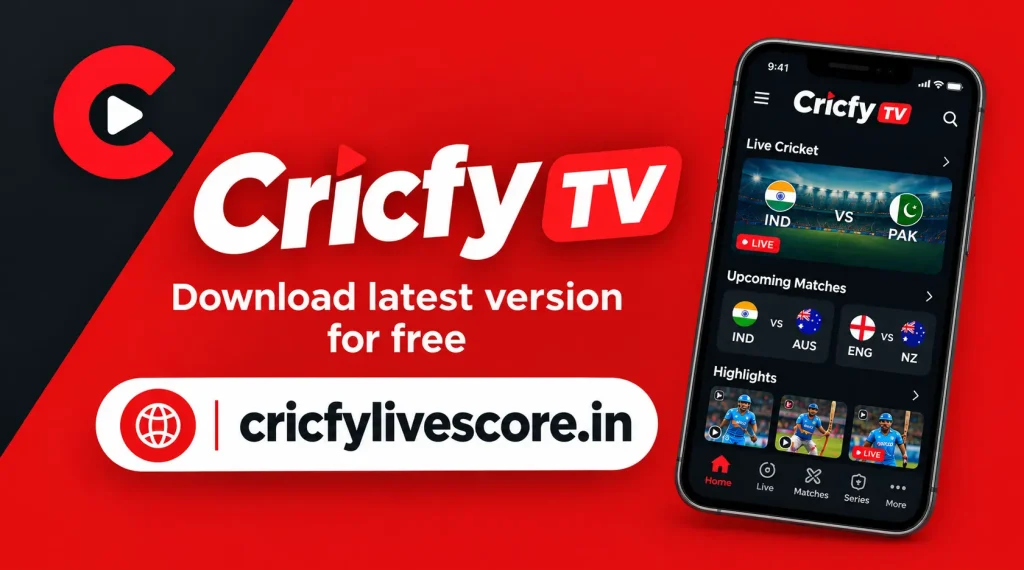
The home screen gives Cricfy TV viewers a place to start browsing. Sports and television groups help you narrow the list. Open a category to see its available events or channels. A label helps you choose the area without typing a search.
Live Events Menu
The events menu can show current match names, teams, and planned start times. A live status helps you tell a game in progress from one scheduled for later. Select an event to view its details, then open an available stream when the match begins.
Channel List and Search
Channel tiles bring feeds into a single list. You can move through a category or use a search option where one is available. An icon helps identify a channel before you open it. Return to the list whenever you want another program without leaving the app.
Player and Settings
The player holds simple video controls while a feed is open. Its settings can include picture quality and sound choices. The layout remains easy to scan. App settings can cover language or match notices. Open the controls to check what each available stream supports, since feeds can differ.
Sports and Events Available
Cricket Coverage
Cricket sits at the heart of the sports area. Cricfy TV Live covers different match formats, including Test games, one-day cricket, and T20 events. International fixtures and domestic leagues give fans several types of games to follow. The IPL, PSL, Asia Cup, and ICC events are examples of competitions viewers look for. A named event does not mean every match will have a working stream at all times. Check the schedule, teams, and available feed on your Android device when a game is due to begin.
Football Coverage
Football fans can browse club and international match listings in the sports area. League games and tournaments bring new fixtures to the menu as their schedules change. Open a football match card to check the teams and start time, then choose a live stream if one is listed. A competition can have different broadcasts in different places. Cricfy TV helps viewers find football beside cricket without claiming that every match from a named league is always available.
Other Sports
The event list also extends to basketball, tennis, wrestling, kabaddi, and other sports. Each one follows its own calendar, so the active menu can often change daily. Browse the current listings to see whether there is a full event, a score, or a short recap. Cricfy TV gives fans room to explore sports outside the two largest categories. A quiet day for one sport can still have events from another.
Finding a Current Event
A match schedule is useful when several games start near each other. Read the team names and start time before choosing a listing. A live label points to an event already under way, while a past entry may lead to a recap. Feeds can appear or close as the broadcast changes. The event area in the app gives you a clearer answer than an older schedule saved elsewhere.
Television Channel Categories
Sports Channel
Sports networks appear in the television area as channel listings. Browse by category or region to find a feed that fits the game you want. A channel carries its program schedule, so check what it is playing before opening the current stream.
News Channels
News feeds give viewers a use for Cricfy TV beyond matches. A local or international channel carries reports and programs during the day. Select a news listing to see its broadcast, as the program follows the channel schedule.
Entertainment Channels
The entertainment area can hold general television, shows, and films. These listings serve viewers who want something to watch later. Open a channel to see its present program. A channel name identifies the feed, but the show can change by time.
Regional and Lifestyle Channels
Regional feeds offer programs tied to a place or language. Other groups can include music and lifestyle content. Use the current menu to find a category that interests you, then choose a channel from that group on your phone.
Supported Devices and Compatibility
Android Phones and Tablets
Android is the home for the Cricfy TV APK. A phone or tablet needs enough storage for the file and the installed app. Check the Android version required by the APK before you save it. A network is needed for live viewing. Touch controls make it simple to move between a match list, channel area, and player. If the file does not match your device, Android can stop the installation.
Android TV and TV Boxes
An Android-powered television or TV box can use an APK. You need a way to move the file onto the device and allow its installation. The remote must also work with the app’s menu. Not every Smart TV runs Android, so check the system before downloading Cricfy TV for Android TV. A different television system cannot install an Android APK directly. Test the channel list and player after installation.
Windows and macOS
A computer runs the Android app through an emulator. Install the emulator, then add the APK inside it. This gives Windows or macOS users a larger screen for viewing. Cricfy TV for PC runs as an Android app in that setup. It is not a native desktop program. Controls stay on screen. Playback depends on the computer and its connection.
iPhone and iPad
This app is specifically designed for the Android platform. iOS users can’t install it directly. iOS users can install third-party apps using IPA profiles. For installing Cricfy TV iOS, users need to look for the IPA file of the app. They can download the IPA file via Safari browser if found. After that they need to open the settings and trust that profile by entering their passcode. After trusting the profile, the file will be installed and becomes available on the home screen.
Cricfy TV Download and Installation
Downloading the APK
Open the download page in your Android browser and select the file that fits your device. Tap the button, then wait until the Cricfy TV APK download has finished. You can find the saved file in Downloads or the browser’s file list. If the download stops, get a complete file before installation. Keep your connection steady.
Installing on Android
Follow these steps after saving Cricfy TV.
- Open the Downloads folder.
- Find the saved Android APK file.
- Tap the file to start setup.
- Allow installation from that source if Android asks.
- Read the warning and app details.
- Review the permissions shown on screen.
- Tap Install and wait for it to finish.
- Open the app and browse a channel.
Turn the install permission off when you no longer need it for that source.
Installation on a TV or PC
Android TV users can transfer an APK by a supported browser or file transfer method. Open the file on the TV, then follow its install prompts. Computer users install an Android emulator and add the APK inside it. Both routes run the Android app with different controls. Test video and sound once the app opens.
Common Problems and Fixes
App Does Not Open
Close Cricfy TV and try again. Restart the device if the opening screen freezes. Check Android compatibility and free storage. A damaged download can also stop the app. Try a complete file if it failed after installation. Check the file name and version before another attempt.
Video Keeps Buffering
Lower the picture setting if a stream pauses often. Stop downloads on the network and move closer to your Wi-Fi router. Mobile data speed can change while moving. Try another feed to see whether the problem affects one source or all video in Cricfy TV.
Channel Is Unavailable
Open the channel menu and read its listings. A feed can go away after an event or leave the menu when schedules change. Some channels can depend on location. If the channel remains listed but will not play, try another feed while it is unavailable.
Streams Do Not Load
Check your internet connection with a web page on your phone first. Return to the event list and try another active feed. A stream may end with its program or be unavailable in your area. If all channels fail, reopen the app and check its status.
No Sound on Android TV
Check the volume in the player and on your television. Make sure the TV uses the sound output you expect, such as speakers. Test another channel before changing device settings. One feed can have a sound issue while other programs still play normally.
APK Does Not Install
Read Android’s message first. The file may be incomplete, your device may lack space, or its Android version may be too old. Check whether installation from your browser or file manager is allowed. An app package can also conflict with a copy on your phone.
Safety and Content Rights
Privacy and Permissions
Cricfy App uses an internet connection to play streams. Read its requested permissions and decide whether each one fits the feature you want. A notification setting needs permission to send alerts, while contact or message access does not serve normal sports viewing. Android settings let you review or remove permissions after the app is installed.
Channel and Event Rights
Live sports and television programs can have rights in different places. A channel name in an app does not explain who holds the right to show each event. Availability can also change when a competition or broadcaster updates its schedule. Check relevant local viewing rules. This helps you choose content you can access while keeping the app’s technical features separate from a program’s broadcast rights.
Advantages and Limitations
Advantages
- Cricket and other sports categories
- Sports and general TV channels
- Android phone and TV options
- Scores and match alerts
- Computer viewing through an emulator
Limitations
- Live viewing needs internet
- Channel lists can change
- APK installation takes extra steps
- Features depend on the available feed
- No native desktop app
Final Thoughts
Cricfy TV brings cricket, other sports, and television channels into one Android app. Viewers can move from an event list to a live stream, then check scores or clips when those options are offered. The APK needs a compatible device and internet for live video. Android TV and computer viewing take their own setup steps. Channel choices can change with schedules and available feeds. Check the current app menu for the event you want, and use the download and problem sections when you need help getting a stream to play.
FAQs
Is the app free to use?
Cricfy TV is offered as a free app for live viewing. Your own mobile network can still charge for data, and individual feeds may carry ads.
What is the latest version?
Version numbers change as APK files are released. Check the file details and compare them with your installed copy before treating a new release as current.
Is the app available on Google Play?
The Android APK needs manual installation outside Google Play. If you see a similar store listing, check its developer and file details before downloading any file.
Can I use the app on a PC?
Yes, you can run the Android APK inside an emulator on Windows or macOS. Install the emulator, then add the app file and open it there.
Can I install the app on an iPhone?
An Android APK will not install directly on an iPhone. An iOS version needs an app file and setup steps, so check those details before downloading.